本篇教程以:Windows 2008操作系统为例,设置办法可以参考如下三种办法其中的一种,新手推荐使用第三种方法
操作前记得先备份下注册表以免出错
一、修改注册表方法
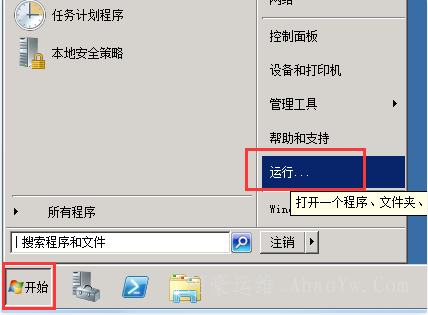
1、点击右下角开始菜单 >> 选择运行
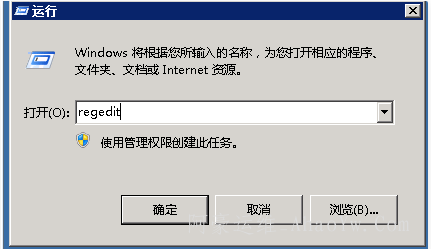
2、在弹出的运行窗口中输入 regedit 然后点击确定打开注册表管理界面
3、在注册表管理界面找到HKEY_LOCAL_MACHINE\SYSTEM\CurrentControlSet\Control\SecurityProviders\SCHANNEL\Protocols
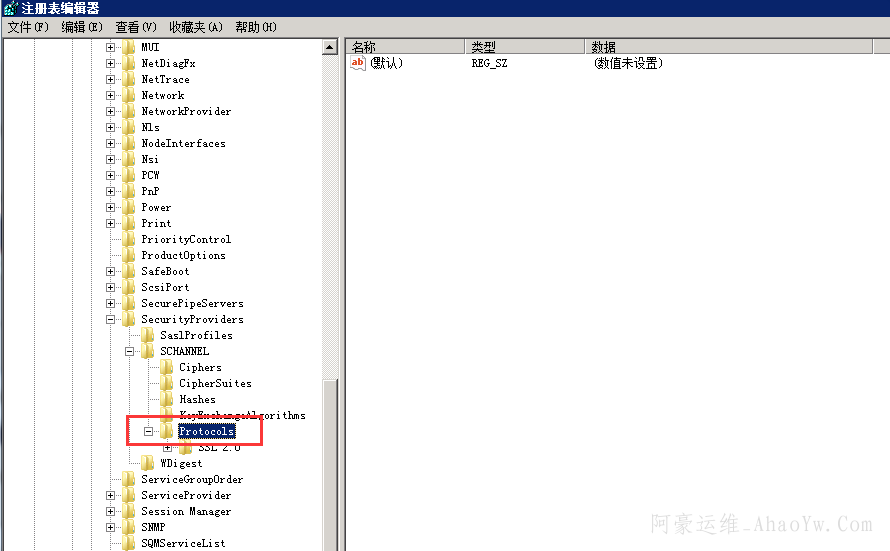
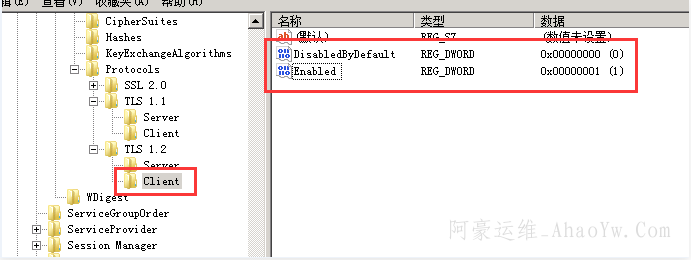
4、右击Protocols 在弹出的菜单中选择新建 >> 项 >> 新建TLS 1.1,TLS 1.2
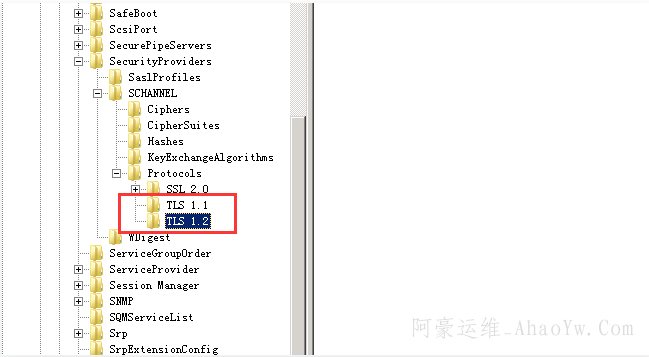
5、在文件TLS 1.1和TLS 1.2分别 右键 >> 新建 >> 项 >> 新建Server, Client
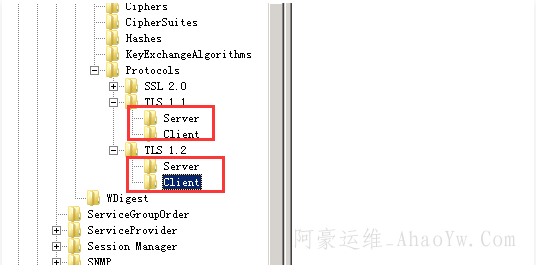
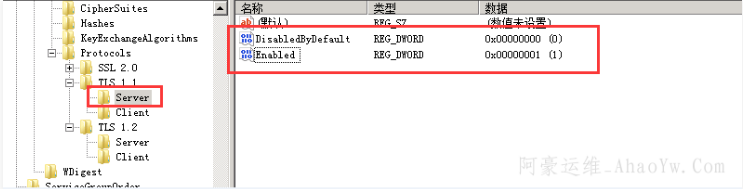
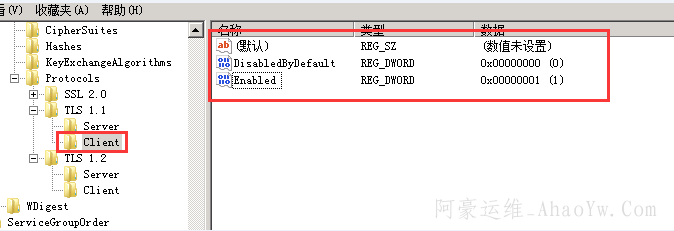
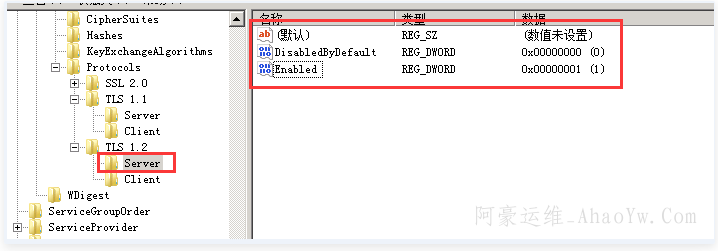
6、.在新建的Server和Client中都新建如下的项(DWORD 32位值),总共4个
名称:DisabledByDefault [Value = 0]
名称:Enabled [Value = 1]
二、直接导入注册表文件方法
ps:导入注册表文件中的双引号是英文字母的双引号,不是中文的双引号
Windows Registry Editor Version 5.00
[HKEY_LOCAL_MACHINE\SYSTEM\CurrentControlSet\Control\SecurityProviders\SCHANNEL\Protocols]

[HKEY_LOCAL_MACHINE\SYSTEM\CurrentControlSet\Control\SecurityProviders\SCHANNEL\Protocols\SSL 2.0]

[HKEY_LOCAL_MACHINE\SYSTEM\CurrentControlSet\Control\SecurityProviders\SCHANNEL\Protocols\SSL 2.0\Client]
"DisabledByDefault"=dword:00000000

[HKEY_LOCAL_MACHINE\SYSTEM\CurrentControlSet\Control\SecurityProviders\SCHANNEL\Protocols\TLS 1.1]
[HKEY_LOCAL_MACHINE\SYSTEM\CurrentControlSet\Control\SecurityProviders\SCHANNEL\Protocols\TLS 1.1\Client]
"DisabledByDefault"=dword:00000000
"Enable"=dword:00000001
[HKEY_LOCAL_MACHINE\SYSTEM\CurrentControlSet\Control\SecurityProviders\SCHANNEL\Protocols\TLS 1.1\Server]
"DisabledByDefault"=dword:00000000
"Enable"=dword:00000001

[HKEY_LOCAL_MACHINE\SYSTEM\CurrentControlSet\Control\SecurityProviders\SCHANNEL\Protocols\TLS 1.2]
[HKEY_LOCAL_MACHINE\SYSTEM\CurrentControlSet\Control\SecurityProviders\SCHANNEL\Protocols\TLS 1.2\Client]
"DisabledByDefault"=dword:00000000
"Enable"=dword:00000001
[HKEY_LOCAL_MACHINE\SYSTEM\CurrentControlSet\Control\SecurityProviders\SCHANNEL\Protocols\TLS 1.2\Server]
"DisabledByDefault"=dword:00000000
"Enable"=dword:00000001
三、 傻瓜式操作方法
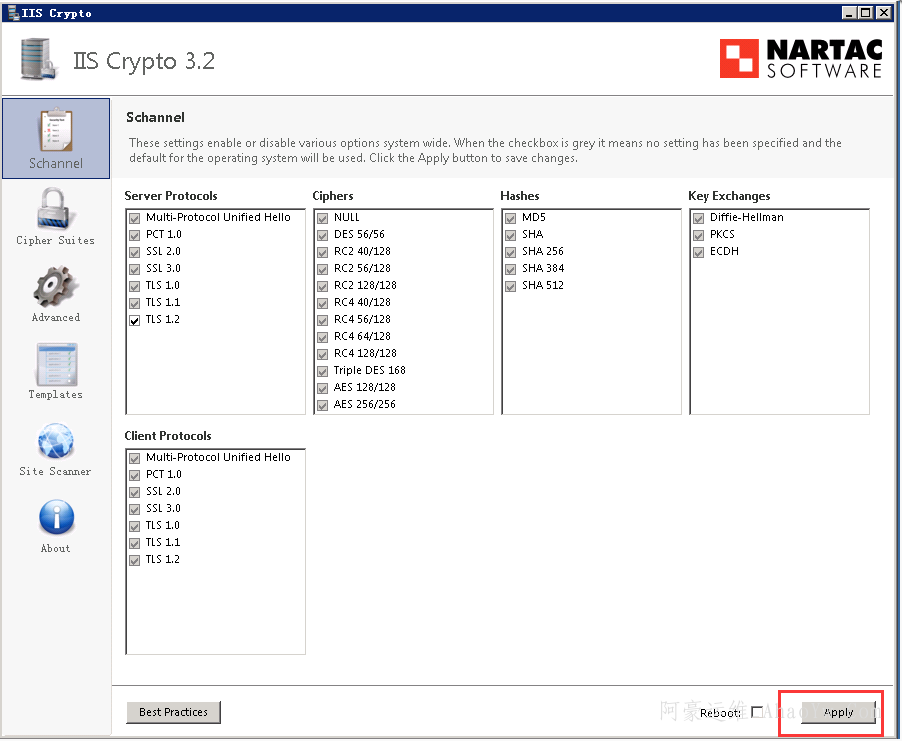
1、下载IISCrypto.exe ,需要安装NET4.0程序才能运行
官网地址https://www.nartac.com/Products/IISCrypto/Download

2、打开软件,配置如下,勾选上TLS 1.2,并去掉不需要的,然后点击”apply“ 软件弹窗提醒你 A reboot of your computer is required for the settings to take effect. (IIS Crypto will not reboot your computer.) 手动重启服务器。搞定!
可以通过这个网页测试检测网站是否支持TLS1.2
https://www.ssllabs.com/ssltest/index.html