X-Frame-Options:
值有三个
(1)DENY:表示该页面不允许在 frame 中展示,即便是在相同域名的页面中嵌套也不允许。
(2)SAMEORIGIN:表示该页面可以在相同域名页面的 frame 中展示。
(3)ALLOW-FROM https://example.com/:表示该页面可以在指定来源的 frame 中展示
Apache如何配置
(如果是在本地的话,就是在httpd.conf里面配置;如果是linux(ubuntu的话)就是在apache2.conf里面),找个空的位置加入这行代码,具体看你是选择哪种
Header always append X-Frame-Options SAMEORIGIN
有可能会遇到一种情况,就是我在服务端配置完apache之后,尝试 Restart Apache 但是报了一个错误:
Invalid command ‘Header’, perhaps misspelled or defined by a module not included in the server configuration
header的方法模块没有安装,我们需要先自行安装一下:
先输入 a2enmod heade ,然后需要重启一下Apache,输入service apache2 restart
Nginx如何配置
配置 nginx 发送 X-Frame-Options 响应头,把下面这行添加到 'http', 'server' 或者 'location' 的配置中:
add_header X-Frame-Options SAMEORIGIN;
IIS如何配置
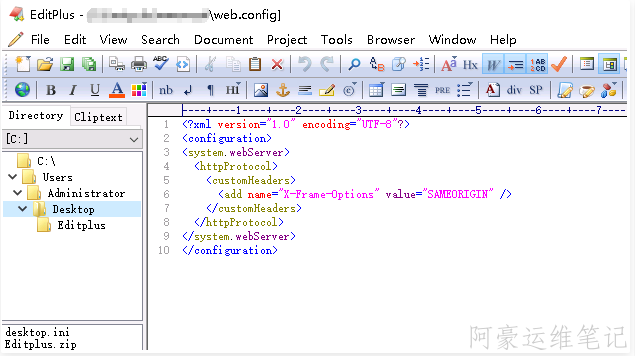
<?xml version="1.0" encoding="UTF-8"?>
<configuration>
<system.webServer>
<httpProtocol>
<customHeaders>
<add name="X-Frame-Options" value="SAMEORIGIN" />
</customHeaders>
</httpProtocol>
</system.webServer>
</configuration>