使用PHP代码开发网站的时候经常会遇到电脑端和移动端的适配,除了响应式外,我们还是通过PHP代码来实现一个文件自动判断当前设备是电脑还是手机显示对应的页面。简单写个教程记录下如何通过php代码实现判断网站访问者当前设备是手机还是电脑!同时也给需要同学提供一丢丢帮助。
代码部分
<?php
function isMobile() {
	static $is_mobile = null;
	if ( isset( $is_mobile ) ) {
		return $is_mobile;
	}
	if ( empty($_SERVER['HTTP_USER_AGENT']) ) {
		$is_mobile = false;
	} elseif ( strpos($_SERVER['HTTP_USER_AGENT'], 'Mobile') !== false // many mobile devices (all iPhone, iPad, etc.)
		|| strpos($_SERVER['HTTP_USER_AGENT'], 'Android') !== false
		|| strpos($_SERVER['HTTP_USER_AGENT'], 'Silk/') !== false
		|| strpos($_SERVER['HTTP_USER_AGENT'], 'Kindle') !== false
		|| strpos($_SERVER['HTTP_USER_AGENT'], 'BlackBerry') !== false
		|| strpos($_SERVER['HTTP_USER_AGENT'], 'Opera Mini') !== false
		|| strpos($_SERVER['HTTP_USER_AGENT'], 'Opera Mobi') !== false ) {
		$is_mobile = true;
	} else {
		$is_mobile = false;
	}
	return $is_mobile;
}

if(isMobile()){
	echo '您正在使用手机访问该页面';
	$html=file_get_contents("wap.html");
	echo $html;
	die();
}else{
	echo '您正在使用电脑访问该页面';
	$html=file_get_contents("pc.html");
	echo $html;
	die();
}
?>
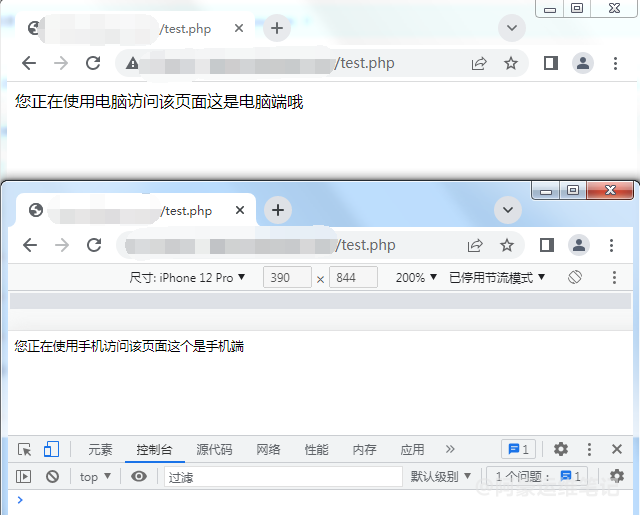
实现效果如下
通过JavaScript脚本跳转方法可以参考:JS判断手机浏览器打开PC网站的时候跳转到移动端网站