操作系统
# lsb_release -a
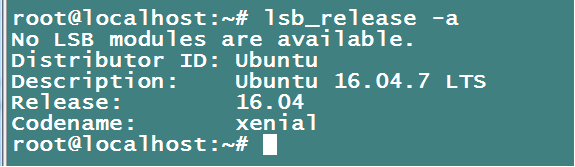
#更新下系统包
apt-get update
安装数据库
#安装依赖库
sudo apt-get -y install libaio-dev
#进入到安装包存放目录
cd /usr/local/src/
下载MySQL
wget -c http://cdn.mysql.com/Downloads/MySQL-5.6/mysql-5.6.51-linux-glibc2.12-x86_64.tar.gz
国内地址 https://repo.huaweicloud.com/mysql/Downloads/MySQL-5.6/mysql-5.6.51-linux-glibc2.12-x86_64.tar.gz
#移动到安装目录
sudo mkdir /usr/local/mysql
tar -xzvf mysql-5.6.51-linux-glibc2.12-x86_64.tar.gz
sudo mv mysql-5.6.51-linux-glibc2.12-x86_64/* /usr/local/mysql
# 新建用户
sudo useradd -s /sbin/nologin mysql -M #不让mysql用户直接登录
sudo chown -R mysql:mysql /usr/local/mysql
#初始化数据库
sudo /usr/local/mysql/scripts/mysql_install_db --basedir=/usr/local/mysql --datadir=/usr/local/mysql/data --user=mysql
PS:出现两个OK表示初始化成功,如果没有的话根据报错解决
cd /usr/local/mysql
sudo cp support-files/my-default.cnf /etc/my.cnf
sudo cp support-files/mysql.server /etc/init.d/mysqld
#设置basedir, datadir
sed -i "46s#basedir=#basedir=/usr/local/mysql#g" /etc/init.d/mysqld
sed -i "47s#datadir=#datadir=/usr/local/mysql/data#g" /etc/init.d/mysqld
#设置开机自动启动
sudo update-rc.d mysqld defaults
sudo service mysqld start #启动mysql
#设置环境变量
sudo echo -e "export PATH=\$PATH:/usr/local/mysql/bin" >>/etc/profile
source /etc/profile
#设置root的密码(不要使用弱密码)
sudo /usr/local/mysql/bin/mysqladmin -u root password
安装PHP
# 安装依赖库
sudo apt-get -y install libxml2-dev libjpeg-dev libpng-dev libfreetype6-dev
sudo apt-get install -y libcurl4-openssl-dev
#安装openssl
cd /usr/local/src
wget https://openssl.org/source/openssl-1.0.2.tar.gz
sudo tar -xzvf ./openssl-1.0.2.tar.gz
cd openssl-1.0.2
sudo ./config --prefix=/usr/local/openssl
sudo make && sudo make install
#安装 libmcryp
cd /usr/local/src
wget -c http://downloads.sourceforge.net/mcrypt/libmcrypt-2.5.8.tar.gz
sudo tar -xzvf ./libmcrypt-2.5.8.tar.gz
cd ./libmcrypt-2.5.8
sudo ./configure --prefix=/usr
sudo make && sudo make install
#安装 mhash
cd /usr/local/src
wget -c http://downloads.sourceforge.net/mhash/mhash-0.9.9.9.tar.gz
sudo tar -xzvf ./mhash-0.9.9.9.tar.gz
cd ./mhash-0.9.9.9
sudo ./configure --prefix=/usr
sudo make && sudo make install
#安装 mcrypt
cd /usr/local/src
wget -c http://downloads.sourceforge.net/mcrypt/mcrypt-2.6.8.tar.gz
sudo tar -xzvf ./mcrypt-2.6.8.tar.gz
cd ./mcrypt-2.6.8
sudo ./configure
sudo make && sudo make install
#安装 libiconv
cd /usr/local/src
wget -c http://ftp.gnu.org/pub/gnu/libiconv/libiconv-1.14.tar.gz
sudo tar -xzvf ./libiconv-1.14.tar.gz
cd ./libiconv-1.14
sudo ./configure --prefix=/usr
sudo make && sudo make install
如果有报错可以参考
编译安装libiconv报错./stdio.h:1010:1: error: ‘gets’ undeclared here (not in a function)
#安装bzip2
cd /usr/local/src
wget -c https://nchc.dl.sourceforge.net/project/bzip2/bzip2-1.0.6.tar.gz
sudo tar -xzvf ./bzip2-1.0.6.tar.gz
cd ./bzip2-1.0.6
sudo make && sudo make install
# 安装 php-5.6.31
cd /usr/local/src
# wget -c http://cn2.php.net/distributions/php-5.6.31.tar.gz
国内下载地址http://mirrors.sohu.com/php/php-5.6.31.tar.gz
sudo tar -xzvf ./php-5.6.31.tar.gz
cd ./php-5.6.31
#新建用户
sudo useradd -s /sbin/nologin www -M #不让www用户直接登录
#生成配置
sudo ./configure --prefix=/usr/local/php --with-config-file-path=/usr/local/php/etc --with-openssl --with-zlib --with-bz2 --with-gd --with-jpeg-dir --with-png-dir --with-gettext --with-mhash --with-freetype-dir --with-mcrypt --with-iconv --with-curl --with-xmlrpc --with-mysql=/usr/local/mysql --with-pdo-mysql=/usr/local/mysql --with-mysqli=/usr/local/mysql/bin/mysql_config --enable-zip --enable-mbstring --enable-mbregex --enable-bcmath --enable-soap --enable-sockets --enable-ftp --enable-gd-native-ttf --enable-shmop --enable-sysvmsg --enable-sysvsem --enable-sysvshm --enable-pcntl --enable-fpm --with-fpm-user=www --with-fpm-group=www --without-pear
#编译安装
sudo make && make install
#复制php配置文件到安装目录
# cp php.ini-production /usr/local/php/etc/php.ini
#配置php-fpm
# cp /usr/local/php/etc/php-fpm.conf.default /usr/local/php/etc/php-fpm.conf
#设置 php-fpm 开机启动
sudo cp sapi/fpm/init.d.php-fpm /etc/init.d/php-fpm #拷贝php-fpm到启动目录
sudo chmod +x /etc/init.d/php-fpm #添加执行权限
sudo update-rc.d php-fpm defaults #设置开机启动
sudo service php-fpm start #启动php-fpm
配置Nginx
sudo apt-get install -y build-essential libtool gcc automake autoconf make
#安装pcre
cd /usr/local/src
wget https://ftp.pcre.org/pub/pcre/pcre-8.40.tar.gz
tar -zxvf pcre-8.40.tar.gz
cd pcre-8.40/
./configure
sudo make && sudo make install
#安装zlib, 支持gzip压缩
cd /usr/local/src
wget http://zlib.net/zlib-1.2.11.tar.gz
tar -zxvf zlib-1.2.11.tar.gz
cd zlib-1.2.11
./configure
make && make install
#安装Nginx
cd /usr/local/src
wget -c http://nginx.org/download/nginx-1.18.0.tar.gz
sudo tar -xzvf ./nginx-1.18.0.tar.gz
cd ./nginx-1.18.0
sudo mkdir /usr/local/nginx
#生成配置
sudo ./configure --sbin-path=/usr/local/nginx/nginx \
--conf-path=/usr/local/nginx/conf/nginx.conf \
--pid-path=/usr/local/nginx/logs/nginx.pid \
--with-http_ssl_module \
--with-pcre=/usr/local/src/pcre-8.40 \
--with-zlib=/usr/local/src/zlib-1.2.11 \
--with-openssl=/usr/local/src/openssl-1.0.2
#编译
sudo make && sudo make install
#复制配置文件
sudo cp /usr/local/nginx/conf/nginx.conf /usr/local/nginx/conf/nginx.conf.bak
> /usr/local/nginx/conf/nginx.conf
# vi /usr/local/nginx/conf/nginx.conf
user www www;
worker_processes 2;
error_log /usr/local/nginx/logs/nginx_error.log crit;
pid /usr/local/nginx/logs/nginx.pid;
worker_rlimit_nofile 51200;
events
{
    use epoll;
    worker_connections 6000;
}
http
{
    include mime.types;
    default_type application/octet-stream;
    server_names_hash_bucket_size 3526;
    server_names_hash_max_size 4096;
    log_format combined_realip '$remote_addr $http_x_forwarded_for [$time_local]'
    ' $host "$request_uri" $status'
    ' "$http_referer" "$http_user_agent"';
    sendfile on;
    tcp_nopush on;
    keepalive_timeout 30;
    client_header_timeout 3m;
    client_body_timeout 3m;
    send_timeout 3m;
    connection_pool_size 256;
    client_header_buffer_size 1k;
    large_client_header_buffers 8 4k;
    request_pool_size 4k;
    output_buffers 4 32k;
    postpone_output 1460;
    client_max_body_size 10m;
    client_body_buffer_size 256k;
    client_body_temp_path /usr/local/nginx/client_body_temp;
    proxy_temp_path /usr/local/nginx/proxy_temp;
    fastcgi_temp_path /usr/local/nginx/fastcgi_temp;
    fastcgi_intercept_errors on;
    tcp_nodelay on;
    gzip on;
    gzip_min_length 1k;
    gzip_buffers 4 8k;
    gzip_comp_level 5;
    gzip_http_version 1.1;
    gzip_types text/plain application/x-javascript text/css text/htm
    application/xml;
    server    {
        listen 80;
        server_name localhost;
        index index.html index.htm index.php;
        root /usr/local/nginx/html;
        location ~ \.php$
        {
            include fastcgi_params;
            fastcgi_pass 127.0.0.1:9000;
            fastcgi_index index.php;
            fastcgi_param SCRIPT_FILENAME /usr/local/nginx/html$fastcgi_script_name;
        }
}
}
/usr/local/nginx/nginx -t 验证配置文件是否正确
#编译启动脚本
在 /etc/init.d/ 下创建 nginx 文件,sudo vi /etc/init.d/nginx,内容如下
DAEMON=/usr/local/nginx/nginx 为安装的Nginx安装目录下的Nginx启动文件
#!/bin/sh

### BEGIN INIT INFO
# Provides:      nginx
# Required-Start:    $local_fs $remote_fs $network $syslog $named
# Required-Stop:     $local_fs $remote_fs $network $syslog $named
# Default-Start:     2 3 4 5
# Default-Stop:      0 1 6
# Short-Description: starts the nginx web server
# Description:       starts nginx using start-stop-daemon
### END INIT INFO

PATH=/usr/local/sbin:/usr/local/bin:/sbin:/bin:/usr/sbin:/usr/bin

DAEMON=/usr/local/nginx/nginx
NAME=www
DESC=www
# Include nginx defaults if available
if [ -r /etc/default/nginx ]; then
    . /etc/default/nginx
fi

STOP_SCHEDULE="${STOP_SCHEDULE:-QUIT/5/TERM/5/KILL/5}"

test -x $DAEMON || exit 0

. /lib/init/vars.sh
. /lib/lsb/init-functions

# Try to extract nginx pidfile
PID=$(cat /usr/local/nginx/conf/nginx.conf | grep -Ev '^\s*#' | awk 'BEGIN { RS="[;{}]" } { if ($1 == "pid") print $2 }' | head -n1)
if [ -z "$PID" ]; then
    PID=/run/nginx.pid
fi

if [ -n "$ULIMIT" ]; then
    # Set ulimit if it is set in /etc/default/nginx
    ulimit $ULIMIT
fi

start_nginx() {
    # Start the daemon/service
    #
    # Returns:
    #   0 if daemon has been started
    #   1 if daemon was already running
    #   2 if daemon could not be started
    start-stop-daemon --start --quiet --pidfile $PID --exec $DAEMON --test > /dev/null \
        || return 1
    start-stop-daemon --start --quiet --pidfile $PID --exec $DAEMON -- \
        $DAEMON_OPTS 2>/dev/null \
        || return 2
}

test_config() {
    # Test the nginx configuration
    $DAEMON -t $DAEMON_OPTS >/dev/null 2>&1
}

stop_nginx() {
    # Stops the daemon/service
    #
    # Return
    #   0 if daemon has been stopped
    #   1 if daemon was already stopped
    #   2 if daemon could not be stopped
    #   other if a failure occurred
    start-stop-daemon --stop --quiet --retry=$STOP_SCHEDULE --pidfile $PID --name $NAME
    RETVAL="$?"
    sleep 1
    return "$RETVAL"
}

reload_nginx() {
    # Function that sends a SIGHUP to the daemon/service
    start-stop-daemon --stop --signal HUP --quiet --pidfile $PID --name $NAME
    return 0
}

rotate_logs() {
    # Rotate log files
    start-stop-daemon --stop --signal USR1 --quiet --pidfile $PID --name $NAME
    return 0
}

upgrade_nginx() {
    # Online upgrade nginx executable
    # http://nginx.org/en/docs/control.html
    #
    # Return
    #   0 if nginx has been successfully upgraded
    #   1 if nginx is not running
    #   2 if the pid files were not created on time
    #   3 if the old master could not be killed
    if start-stop-daemon --stop --signal USR2 --quiet --pidfile $PID --name $NAME; then
        # Wait for both old and new master to write their pid file
        while [ ! -s "${PID}.oldbin" ] || [ ! -s "${PID}" ]; do
            cnt=`expr $cnt + 1`
            if [ $cnt -gt 10 ]; then
                return 2
            fi
            sleep 1
        done
        # Everything is ready, gracefully stop the old master
        if start-stop-daemon --stop --signal QUIT --quiet --pidfile "${PID}.oldbin" --name $NAME; then
            return 0
        else
            return 3
        fi
    else
        return 1
    fi
}

case "$1" in
    start)
        log_daemon_msg "Starting $DESC" "$NAME"
        start_nginx
        case "$?" in
            0|1) log_end_msg 0 ;;
            2)   log_end_msg 1 ;;
        esac
        ;;
    stop)
        log_daemon_msg "Stopping $DESC" "$NAME"
        stop_nginx
        case "$?" in
            0|1) log_end_msg 0 ;;
            2)   log_end_msg 1 ;;
        esac
        ;;
    restart)
        log_daemon_msg "Restarting $DESC" "$NAME"

        # Check configuration before stopping nginx
        if ! test_config; then
            log_end_msg 1 # Configuration error
            exit $?
        fi

        stop_nginx
        case "$?" in
            0|1)
                start_nginx
                case "$?" in
                    0) log_end_msg 0 ;;
                    1) log_end_msg 1 ;; # Old process is still running
                    *) log_end_msg 1 ;; # Failed to start
                esac
                ;;
            *)
                # Failed to stop
                log_end_msg 1
                ;;
        esac
        ;;
    reload|force-reload)
        log_daemon_msg "Reloading $DESC configuration" "$NAME"

        # Check configuration before stopping nginx
        #
        # This is not entirely correct since the on-disk nginx binary
        # may differ from the in-memory one, but that's not common.
        # We prefer to check the configuration and return an error
        # to the administrator.
        if ! test_config; then
            log_end_msg 1 # Configuration error
            exit $?
        fi

        reload_nginx
        log_end_msg $?
        ;;
    configtest|testconfig)
        log_daemon_msg "Testing $DESC configuration"
        test_config
        log_end_msg $?
        ;;
    status)
        status_of_proc -p $PID "$DAEMON" "$NAME" && exit 0 || exit $?
        ;;
    upgrade)
        log_daemon_msg "Upgrading binary" "$NAME"
        upgrade_nginx
        log_end_msg $?
        ;;
    rotate)
        log_daemon_msg "Re-opening $DESC log files" "$NAME"
        rotate_logs
        log_end_msg $?
        ;;
    *)
        echo "Usage: $NAME {start|stop|restart|reload|force-reload|status|configtest|rotate|upgrade}" >&2
        exit 3
        ;;
esac
#设置服务脚本有执行权限
sudo chmod +x /etc/init.d/nginx
#注册服务
cd /etc/init.d/
sudo update-rc.d nginx defaults
sudo service nginx start #启动nginx
测试PHP页面
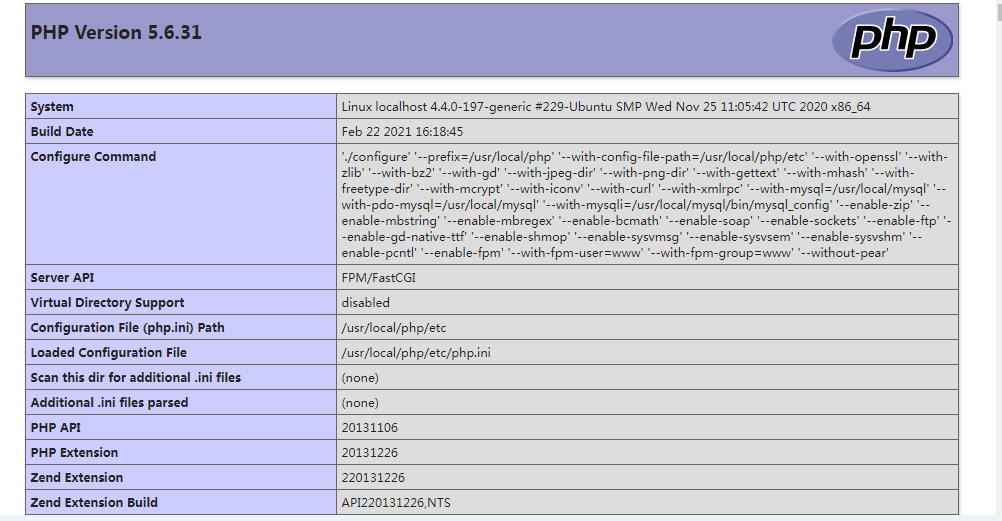
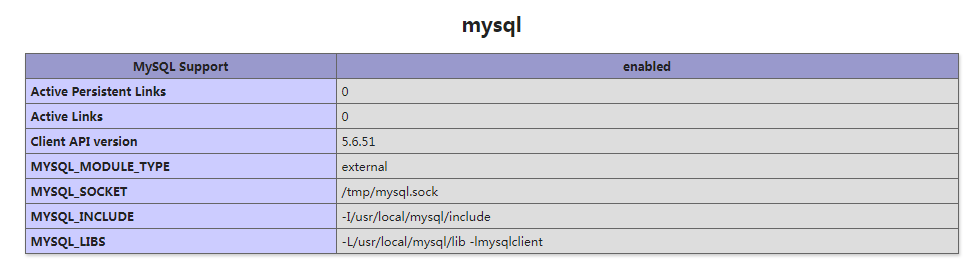
echo "<?php phpinfo();?>" >>/usr/local/nginx/html/phpinfo.php