 首页
首页 阿豪运维笔记
Linux系统中创建的普通用户使用su命令切换root用户时提示su: Authentication failure错误
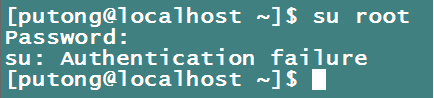
通过root用户执行cat /var/log/secure查看secure日志,显示如下错误信息。
May 14 17:19:08 localhost unix_chkpwd[1682]: check pass; user unknown
May 14 17:19:10 localhost unix_chkpwd[1683]: check pass; user unknown
May 14 17:19:10 localhost unix_chkpwd[1683]: password check failed for user (root)
May 14 17:19:10 localhost su: pam_unix(su:auth): authentication failure; logname=putong uid=1000 euid=1000 tty=pts/1 ruser=putong rhost= user=root
May 14 17:19:10 localhost su: pam_succeed_if(su:auth): requirement "uid >= 1000" not met by user "root"

出现这个报错可能是因为/bin/su命令文件缺少s权限,导致普通用户无法使用su命令切换root用户
解决办法
1、使用root用户登录Linux系统
2、执行如下命令,查看/bin/su文件权限
ls -l /bin/su
返回结果如下所示,说明/bin/su命令文件缺少s权限

3、执行如下命令,为/bin/su文件添加s权限
chmod u+s /bin/su
4、重新在普通用户下使用su命令切换root用户正常可以切换登入成功